
A stack is a linear data structure that follows the Last-In-First-Out (LIFO) principle.
Think of it like a stack of pancakes - you can only add or remove pancakes from the top.
Stacks
A stack is a data structure that can hold many elements, and the last element added is the first one to be removed.
Like a pile of pancakes, the pancakes are both added and removed from the top. So when removing a pancake, it will always be the last pancake you added. This way of organizing elements is called LIFO: Last In First Out.
Basic operations we can do on a stack are:
- Push: Adds a new element on the stack.
- Pop: Removes and returns the top element from the stack.
- Peek: Returns the top (last) element on the stack.
- isEmpty: Checks if the stack is empty.
- Size: Finds the number of elements in the stack.
Stacks can be implemented by using arrays or linked lists.
Stacks can be used to implement undo mechanisms, to revert to previous states, to create algorithms for depth-first search in graphs, or for backtracking.
Stacks are often mentioned together with Queues, which is a similar data structure described on the next page.
Stack Implementation using Python Lists
For Python lists (and arrays), a stack can look and behave like this:
Since Python lists has good support for functionality needed to implement stacks, we start with creating a stack and do stack operations with just a few lines like this:
Example
stack = []

# Push
stack.append('A')
stack.append('B')
stack.append('C')
print("Stack: ", stack)

# Peek
topElement = stack[-1]
print("Peek: ", topElement)

# Pop
poppedElement = stack.pop()
print("Pop: ", poppedElement)

# Stack after Pop
print("Stack after Pop: ", stack)

# isEmpty
isEmpty = not bool(stack)
print("isEmpty: ", isEmpty)

# Size
print("Size: ",len(stack))
While Python lists can be used as stacks, creating a dedicated Stack class provides better encapsulation and additional functionality:
Example
class Stack:
  def __init__(self):
    self.stack = []

  def push(self, element):
    self.stack.append(element)

  def pop(self):
    if self.isEmpty():
      return "Stack is empty"
    return self.stack.pop()

  def peek(self):
    if self.isEmpty():
      return "Stack is empty"
    return self.stack[-1]

  def isEmpty(self):
    return len(self.stack) == 0

  def size(self):
    return len(self.stack)

# Create a stack
myStack = Stack()

myStack.push('A')
myStack.push('B')
myStack.push('C')

print("Stack: ", myStack.stack)
print("Pop: ", myStack.pop())
print("Stack after Pop: ", myStack.stack)
print("Peek: ", myStack.peek())
print("isEmpty: ", myStack.isEmpty())
print("Size: ", myStack.size())
Reasons to implement stacks using lists/arrays:
- Memory Efficient: Array elements do not hold the next elements address like linked list nodes do.
- Easier to implement and understand: Using arrays to implement stacks require less code than using linked lists, and for this reason it is typically easier to understand as well.
A reason for not using arrays to implement stacks:
- Fixed size: An array occupies a fixed part of the memory. This means that it could take up more memory than needed, or if the array fills up, it cannot hold more elements.
Stack Implementation using Linked Lists
A linked list consists of nodes with some sort of data, and a pointer to the next node.
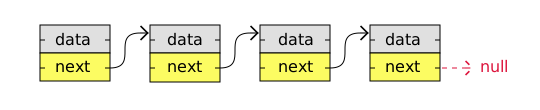
A big benefit with using linked lists is that nodes are stored wherever there is free space in memory, the nodes do not have to be stored contiguously right after each other like elements are stored in arrays. Another nice thing with linked lists is that when adding or removing nodes, the rest of the nodes in the list do not have to be shifted.
To better understand the benefits with using arrays or linked lists to implement stacks, you should check out this page that explains how arrays and linked lists are stored in memory.
This is how a stack can be implemented using a linked list.
Example
class Node:
  def __init__(self, value):
    self.value = value
    self.next = None

class Stack:
  def __init__(self):
    self.head = None
    self.size = 0

  def push(self, value):
    new_node = Node(value)
    if self.head:
      new_node.next = self.head
    self.head = new_node
    self.size += 1

  def pop(self):
    if self.isEmpty():
      return "Stack is empty"
    popped_node = self.head
    self.head = self.head.next
    self.size -= 1
    return popped_node.value

  def peek(self):
    if self.isEmpty():
      return "Stack is empty"
    return self.head.value

  def isEmpty(self):
    return self.size == 0

  def stackSize(self):
    return self.size

  def traverseAndPrint(self):
    currentNode = self.head
    while currentNode:
      print(currentNode.value, end=" -> ")
      currentNode = currentNode.next
    print()

myStack = Stack()
myStack.push('A')
myStack.push('B')
myStack.push('C')

print("LinkedList: ", end="")
myStack.traverseAndPrint()
print("Peek: ", myStack.peek())
print("Pop: ", myStack.pop())
print("LinkedList after Pop: ", end="")
myStack.traverseAndPrint()
print("isEmpty: ", myStack.isEmpty())
print("Size: ", myStack.stackSize())
A reason for using linked lists to implement stacks:
- Dynamic size: The stack can grow and shrink dynamically, unlike with arrays.
Reasons for not using linked lists to implement stacks:
- Extra memory: Each stack element must contain the address to the next element (the next linked list node).
- Readability: The code might be harder to read and write for some because it is longer and more complex.
Common Stack Applications
Stacks are used in many real-world scenarios:
- Undo/Redo operations in text editors
- Browser history (back/forward)
- Function call stack in programming
- Expression evaluation
