The Temporal.PlainDateTime Object
The Temporal.PlainDateTime object is a pure date and time object.
It represents a calendar date and a wall-clock time with no time zone.
Example: 2026-05-07T14:30:00.
Example
// Create a PlainDateTime object

const dateTime = Temporal.PlainDateTime.from("2026-05-17T14:30:00");
The T is a literal to separate the date from the time.
What You Should Learn:
- How to use JavaScript Temporal.PlainDateTime
- How to work with date and time without a time zone
- How to add and subtract dates
- How to compare dates safely
Note: PlainDateTime is useful when you need both date and time, but not time zone.
How to Create a PlainDateTime Object
An PlainDateTime object can be created in several different ways:
| Col 1 | Col 2 |
|---|---|
| From | Code |
| Constructor (new) | new Temporal.PlainDateTime() |
| ISO String | Temporal.PlainDateTime.from() |
| Now (current time) | Temporal.Now.plainDateTimeISO() |
Create a PlainDateTime with new
You can create a PlainDateTime object using the new constructor.
The constructor takes parameters like year, month, day, hours, and minutes.
Example
// Create a PlainDateTime object

const date = new Temporal.PlainDateTime(2026, 5, 17, 14, 30);
Note: In Temporal objects, months start at 1. In the legacy Date object, months start at 0.
Create a PlainDateTime from a String
You can create a PlainDateTime object from an ISO 8601 / RFC 9557 string.
Example
// Create a PlainDateTime object

const dateTime = Temporal.PlainDateTime.from("2026-05-17T10:00:00");
The T Between Date and Time?
The T is a literal to separate the date from the time.
You should read it as an abbreviation for Time.
It is the separator required by the ISO 8601 format.
Create a PlainDateTime from Now
You can create a PlainDateTime object from current time.
Example
const now = Temporal.Now.plainDateTimeISO();
Add or Subtract PlainDateTime
You can safely add or subtract time.
The original value does not change.
Example
// Create a PlainDateTime object

const date = Temporal.PlainDateTime.from("2026-05-17T14:30:00");

// Add and subtract time

const earlier = date.subtract({ minutes: 30 });

const later = date.add({ hours: 2 });
When to Use PlainDateTime
- Applications where time zone conversion is not required.
- Local event scheduling.
- Appointments without international time zone handling.
- Forms that collect date and time.
Compare PlainDateTime Values
You can compare PlaneDateTime values using the equals() method.
Example
const d1 = Temporal.PlainDateTime.from("2026-05-17T14:30:00");

const d2 = Temporal.PlainDateTime.from("2026-05-17T14:30:00");

let result = d1.equals(d2)
Most (*) temporal objects have their own equals() method:
- instant.equals(instant)
- plaindate.equals(plaindate)
- plaintime.equals(plaintime)
- plainyearmonth.equals(plainyearmonth)
- plainmonthday.equals(plainmonthday)
- plaindateTime.equals(plaindatetime)
- zoneddateTime.equals(zoneddtatime)
(*) Duration has not.
Note: Learn More: JavaScript Temporal Compare
Convert to ZonedDateTime
A PlainDateTime object does not include time zone information.
You can convert it to a ZonedDateTime if needed.
Example
const dateTime = Temporal.PlainDateTime.from("2026-05-17T10:00:00");

const zoned = dateTime.toZonedDateTime("Europe/Oslo");
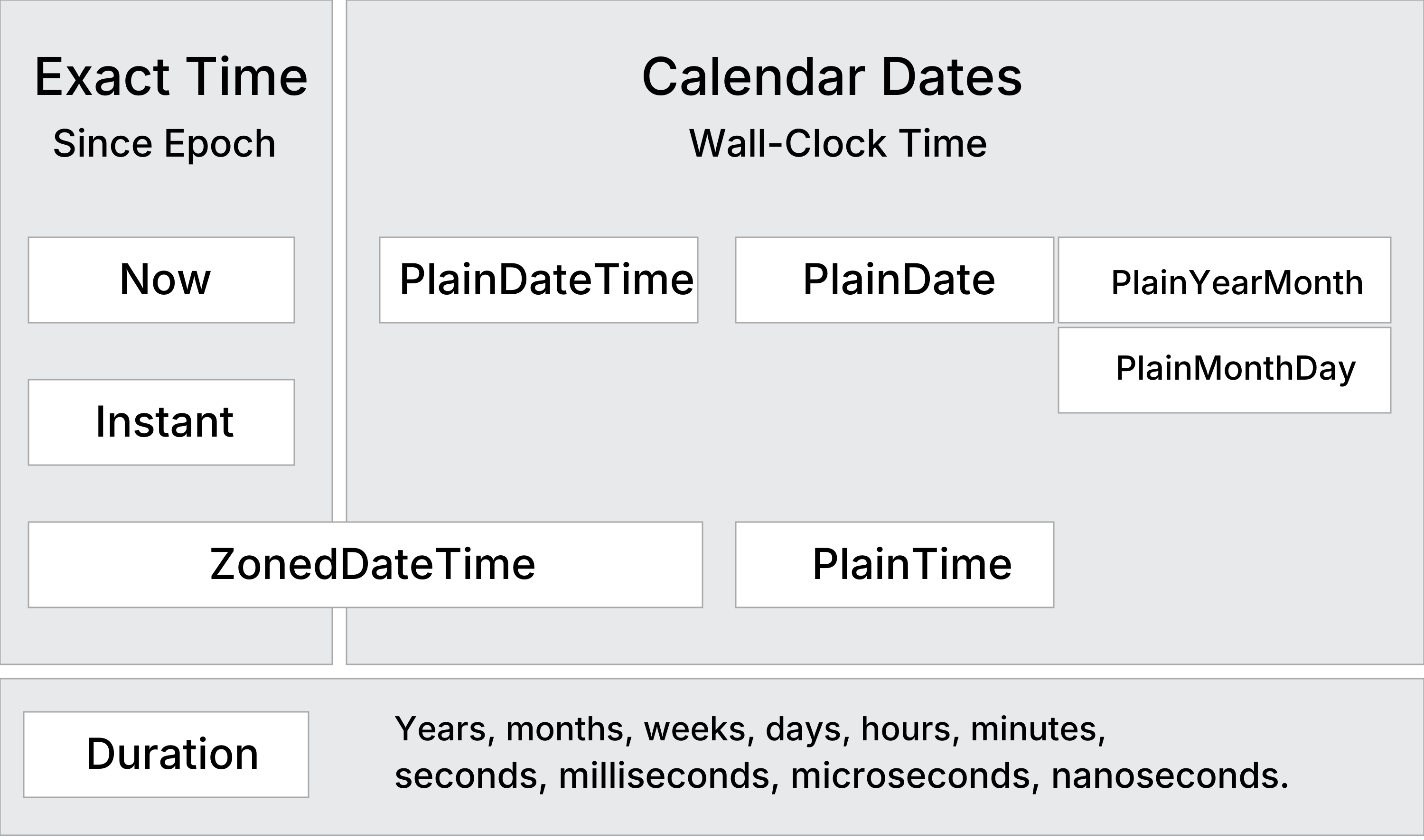
Compare PlainDateTime with Other Types
| Col 1 | Col 2 |
|---|---|
| Type | Meaning |
| Instant | Exact Moment in UTC time |
| PlainDateTime | Plaind Date and Time (No Timezone) |
| ZonedDateTime | Local Date and Time (+ Time Zone) |
Temporal.PlainDateTime Methods
| Col 1 | Col 2 |
|---|---|
| Constructing | Description |
| from() | Creates a PlainDateTime object from an object or a string |
| new | Creates a PlainDateTime object from parameters |
| Arithmetic | |
| add() | Returns a PlainDateTime with a duration added |
| subtract() | Returns a PlainDateTime with a duration subtracted |
| round() | Returns a PlainDateTime rounded to a given unit |
| Comparing | |
| compare() | Returns -1, 0, or 1 from comparing two dates |
| equals() | Returns true if two PlainDateTime objects are identical |
| since() | Returns the difference from another PlainDateTime |
| until() | Returns the difference until another PlainDateTime |
| Converting | |
| toPlainDate() | Returns a PlainDate object with the date from this PlainDateTime |
| toPlainTime() | Returns a PlainTime object with the time from this PlainDateTime |
| toZonedDateTime() | Returns a ZonedDatetime object with this PlainDateTime in a time zone |
| with() | Returns a PlainDateTime with specified fields modified |
| withCalendar() | Returns a PlainDateTime with a different calendar system |
| withPlainTime() | Returns a PlainDateTime with the time part replaced by a new time |
| Formatting | |
| toJSON() | Returns an RFC 9557 format string for JSON serialization |
| toLocaleString() | Returns a language-sensitive representation of the date |
| toString() | Returns an RFC 9557 format string representation of the date |
| valueOf() | Throws an error to prevents temporals from being converted to primitives |
Temporal.PlainDateTime Properties
The Temporal.PlainDateTime object has 22 properties of date information.
Display all PlainDateTime PropertiesExample
const date = new Temporal.PlainDateTime(2026, 5, 1, 14, 30);
| Col 1 | Col 2 |
|---|---|
| Property | Description |
| calendarID | Calendar system identifier ("iso8601") |
| day | The day as an integer (1-31) |
| dayOfWeek | The day of the week as an integer (1 = Monday) |
| dayOfYear | The ordinal day of the year |
| daysInMonth | The total number of days in that month |
| daysInWeek | The total number of days in that week |
| daysInYear | The total number of days in that year |
| era | The era name of the calendar, if applicable ("gregory") |
| eraYear | The year within the era, if applicable |
| hour | The hour as an integer (0-23 |
| inLeapYear | A boolean indicating if the date falls in a leap year |
| microsecond | The microsecond as an integer (0-999) |
| millisecond | The millisecond as an integer (0-999) |
| minute | The minute as an integer (0-59) |
| month | The month as an integer (1-12) |
| monthCode | A calendar-specific string code for the month ("M01") |
| monthsInYear | The total number of months in that year |
| nanosecond | The nanosecond as an integer (0-999) |
| second | The second as an integer (0-59) |
| weekOfYear | The week number within the year |
| year | The year as an integer |
| yearOfWeek | The year that the week belongs to |
