JSON has a very simple syntax for representing structured data.
One JSON document consists of one JSON value.
The value can be:
- An Object
- An Array
- A String
- A Number
- A Boolean
- or null
JSON Object Literals
This is a JSON string:
'{"name":"John", "age":30, "car":null}'
Inside the JSON string there is a JSON object literal:
{"name":"John", "age":30, "car":null}
A JSON object is written between curly braces { }.
An object contains zero or more properties.
Properties comes in key/value pairs separated by commas.
key names are strings enclosed in double quotes.
Keys and values are separated by a colon.

Values must be a valid JSON data type. JSON supports six value types:
| Col 1 | Col 2 |
|---|---|
| Value | Example |
| String | "John" |
| Number | 42 |
| Boolean | true |
| Null | null |
| Object | {"name" : "John"} |
| Array | [1, 2, 3] |
Note: It is a common mistake to call a JSON object literal "a JSON object". JSON cannot be an object. JSON is a string format. The data is only JSON when it is in a string format. When a JSON object litteral is converted into a JavaScript variable, it becomes a JavaScript object.
JSON Array Literals
This is a JSON string:
'["Ford", "BMW", "Fiat"]'
Inside the JSON string there is a JSON array literal:
["Ford", "BMW", "Fiat"]
Other Examples
[

  "Apple",

  "Banana",

  "Orange"

]
A JSON array is written between square brackets [ ].
An array contains zero or more values.
Values are separated by commas.
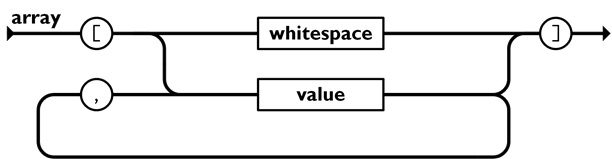
Values can be any of the six JSON data types:
| Col 1 | Col 2 |
|---|---|
| Value | Example |
| String | "John" |
| Number | 42 |
| Boolean | true |
| Null | null |
| Object | {"name" : "John"} |
| Array | [1, 2, 3] |
Note: JSON syntax is derived from JavaScript object notation syntax: Curly braces hold objects Properties comes is in name/value pairs Properties are separated by commas Square brackets hold arrays Strings are in double quotes But, JSON has stricter syntax rules than JavaScript objects.
JSON Does Not Allow
JSON has a small, strict syntax.
The following JavaScript features are not valid JSON:
| Col 1 | Col 2 | Col 3 |
|---|---|---|
| Feature | JSON | JS |
| Unquoted property names | No | Yes |
| Single quoted strings | No | Yes |
| Trailing commas | No | Yes |
| Comments | No | Yes |
JSON Property Names
Every property name must be a string.
Property names must be enclosed in double quotes.
Valid:
{

  "name": "John"

}
JSON Strings
JSON strings must use double quotes.
Valid:
{

  "city": "London"

}
Whitespace
Whitespace is ignored outside strings.
You can use spaces, tabs, and line breaks to make JSON easier to read.
Example
{"name":"John", "age":30}
Trailing Commas
JSON does not allow a comma after the last property or array value.
Wrong:
{

  "name": "John",

  "age": 30,

}
Comments Are Not Allowed
JSON does not support comments.
Wrong
{

  // Customer name

  "name": "John"

}
