What is Cloud Security?
Building and maintaining a secure cloud environment requires protecting data, networks, and applications from threats. Security in the cloud is a shared responsibility between AWS and its customers.
AWS provides security mechanisms to prevent incidents, protect resources, and detect and respond to threats. This section covers the key concepts and services that help protect your cloud resources.
Introduction to Security Video
W3schools.com collaborates with Amazon Web Services to deliver digital training content to our learners.
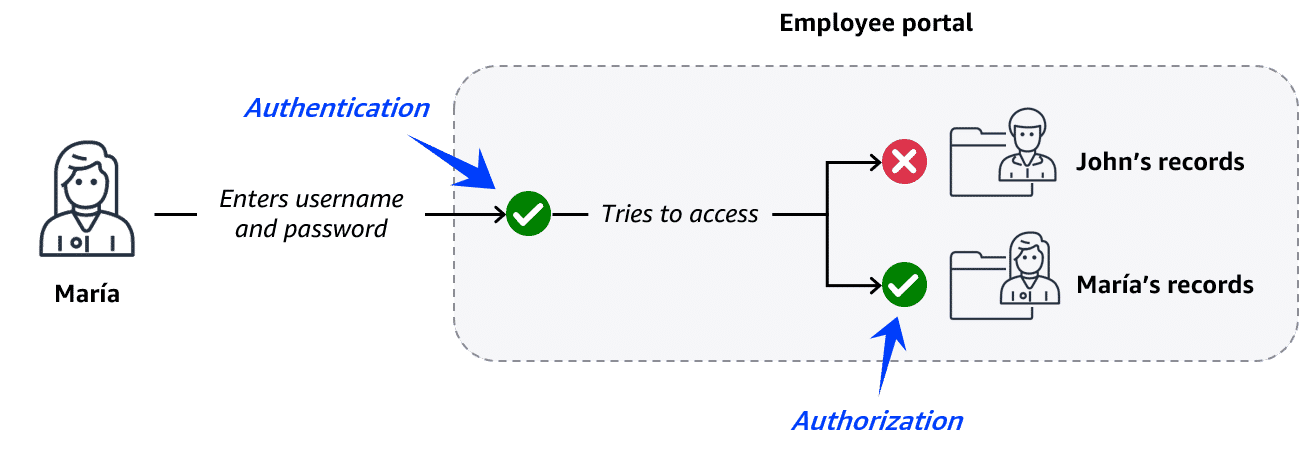
Authentication vs Authorization
Authentication
Verifies identity through credentials like username and password. Example: An employee logs in to an employee portal.
Authorization
Determines which actions a verified user can perform. Example: An employee can only access their own records.
AWS Security Controls
AWS offers multiple security mechanisms to protect your cloud resources:
- Prevent: Security incidents through proper permission and access management
- Protect: Networks, applications, and data
- Detect and Respond: To security incidents as they occur
